
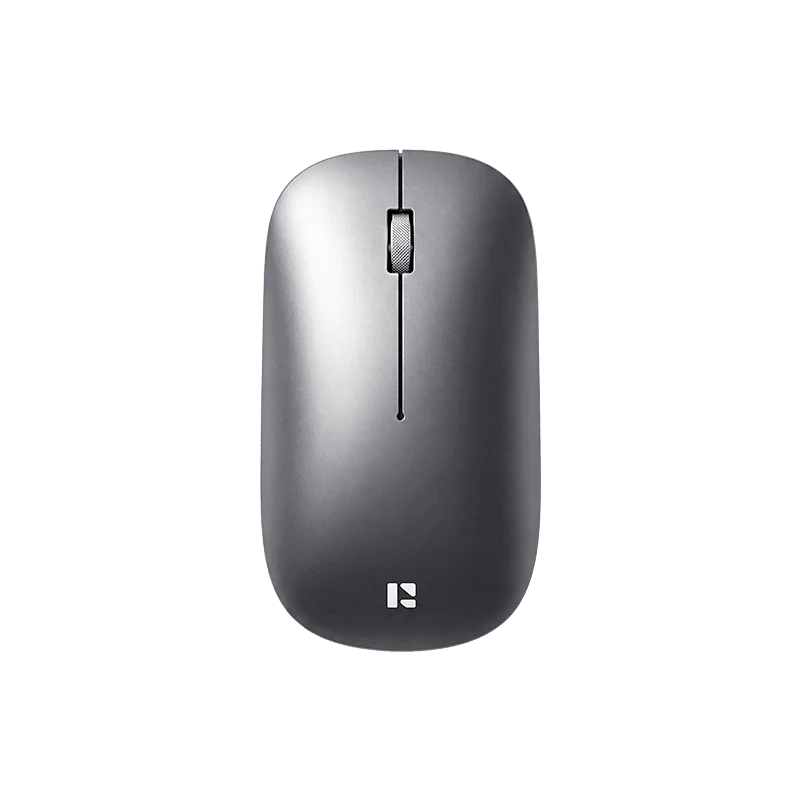
REMAX WM-02 Business Series Wireless Mouse
৳1700
Color
Category: Office and computer
The REMAX WM-02 Business Series is a rechargeable wireless mouse that combines Bluetooth and 2.4GHz connectivity in a single slim body. With a 400mAh built-in battery, USB Type-C charging, silent click buttons, and adjustable DPI, it targets office workers, students, and remote professionals who need quiet, reliable cordless performance across multiple devices at a BDT 1,999 price point on Adatun.
Remax wm-02 wireless mouse price in bangladesh: Key takeaways
- Dual connectivity: Bluetooth and 2.4GHz wireless work simultaneously
- 400mAh rechargeable battery with USB Type-C — no disposable cells
- Silent click buttons keep the mouse unobtrusive in shared spaces
- Adjustable DPI for switching between precision and fast cursor movement
- Slim ergonomic shape with skin-friendly finish for all-day comfort
REMAX WM-02 Wireless Mouse Price in Bangladesh
The REMAX WM-02 is priced at BDT 1,999 on Adatun, positioning it in the mid-range segment of the Bangladeshi wireless mouse market. At this price, buyers get dual-mode connectivity — both Bluetooth pairing and a 2.4GHz USB nano-receiver — which is typically found in higher-priced models. The built-in 400mAh rechargeable battery eliminates the cost and hassle of replacing AA or AAA cells over time, making the total cost of ownership lower than budget cordless mice that rely on disposable batteries. The USB Type-C charging port means users can top up using the same cable that charges most modern Android smartphones, tablets, and laptops.
What Is the REMAX WM-02?
The REMAX WM-02 is a dual-mode cordless mouse from REMAX's Business Series line, designed for professionals and students who move between multiple devices throughout the day. It connects via Bluetooth to laptops, tablets, and phones without占用 a USB port, while the included 2.4GHz nano receiver plugs into devices that lack Bluetooth or when a more direct wireless link is preferred. The mouse uses a 400mAh lithium-ion cell that recharges through a USB Type-C port — a modern standard that has become universal across the gadget ecosystem in Bangladesh.
The silent click button design reduces acoustic output compared to standard mice, making the WM-02 suitable for open-plan offices, library study rooms, late-night work sessions, and video calls where a loud clicking mouse would be distracting. Adjustable DPI lets users toggle between different cursor speeds on the fly, which is useful when switching from a spreadsheet to a design canvas or a presentation slide.
Key Features of the REMAX WM-02
- Dual-mode wireless connectivity: Pairs with up to two devices simultaneously — one over Bluetooth and one via the 2.4GHz USB nano receiver. A physical button on the base switches between the two connections instantly.
- 400mAh rechargeable battery: The built-in lithium cell delivers enough capacity for a full working day on a single charge. There are no disposable batteries to buy or dispose of.
- USB Type-C charging: Uses the same reversible connector found on most Android smartphones, laptops, and tablets sold in Bangladesh. Charging time is roughly 2 hours from empty to full.
- Silent click buttons: The left and right buttons produce minimal acoustic noise — a meaningful advantage in quiet office environments, shared workspaces, and home offices during video calls.
- Adjustable DPI: A dedicated button on top of the mouse cycles through sensitivity presets, allowing quick adjustment between precise work (such as photo editing) and faster cursor movement for browsing or presentations.
- Slim ergonomic design: The low-profile shell fits comfortably in the palm during extended sessions. The contoured shape guides the hand into a natural grip position that reduces fatigue over hours of use.
- Skin-friendly surface finish: The outer shell has a smooth, matte texture that feels comfortable against the hand and resists fingerprints and minor scuffs during daily use.
- Stable wireless transmission: Both Bluetooth 5.x and the 2.4GHz link are engineered for reliable signal stability within a typical 8–10 metre range, suitable for desk-to-whiteboard distances in most meeting rooms.
Specifications
- Brand: REMAX
- Model: WM-02
- Series: Business Series
- Product Type: Rechargeable Wireless Mouse
- Connectivity: Bluetooth + 2.4GHz Wireless (dual-mode)
- Battery Capacity: 400mAh
- Charging Port: USB Type-C
- Button Type: Silent Click
- DPI: Adjustable
- Design: Slim & Ergonomic
- Surface Finish: Skin-Friendly
- Recommended Use: Office, Home, Business, Study & Travel
Who Is the REMAX WM-02 For?
The REMAX WM-02 is built for anyone who spends significant time at a desk and values a quiet, clutter-free setup. In Bangladesh's growing remote work and freelancing culture, professionals often use two devices — a work laptop and a personal tablet, or a desktop at home and a laptop on the go. The WM-02's dual-mode design lets a single mouse swap seamlessly between those devices without re-pairing each time. Students working from dorm rooms or home study spaces benefit from the silent click design, which keeps noise to a minimum during group calls or late-night sessions.
Office and business use
For open-plan offices, the silent click buttons prevent the repetitive tapping sound that can distract nearby colleagues. The 400mAh battery means the mouse can run through a full workday without needing a charge mid-afternoon. When the battery does run low, a USB Type-C cable and any standard phone charger or laptop USB port will replenish it within about two hours.
Remote and home work
At a home desk, the WM-02's slim profile makes it easy to pack into a laptop bag for hybrid workers who split time between a home office and a co-working space. The 2.4GHz nano receiver is small enough to stay plugged into a laptop without protruding or getting knocked, and the Bluetooth mode works without any receiver for devices that support it.
Travel and on-the-go productivity
Weighing less than many full-size mice, the WM-02 slips into a sleeve alongside a laptop or tablet without adding noticeable bulk. The ability to connect over Bluetooth means one less cable to manage — no dongle to remember or lose while moving between locations.
How to Connect and Use the WM-02
Setting up the REMAX WM-02 takes under a minute. For Bluetooth pairing, put the mouse into discovery mode by pressing the connection button on the base — the LED indicator will flash to show it is searchable. Open the Bluetooth settings on your laptop, tablet, or phone and select "REMAX WM-02" from the available devices list. For the 2.4GHz connection, simply insert the nano receiver into a free USB-A port on your computer; the mouse connects automatically within seconds of turning it on. To switch between the two paired devices, press the small button on the underside of the mouse to toggle the active connection.
The DPI button cycles through preset sensitivity levels. The exact number of levels varies by firmware version, but the typical range covers low DPI for detailed photo or video editing and higher DPI for large monitors, presentations, and fast-paced browsing.
What's Included
- REMAX WM-02 Business Series wireless mouse
- USB Type-C charging cable
- 2.4GHz USB nano receiver
- User manual
REMAX WM-02 vs. Other Budget Wireless Mice
The WM-02 differentiates itself through its dual-mode connectivity at the BDT 1,999 price point. Many budget wireless mice offer only one connection method — either Bluetooth or a USB receiver — forcing users to choose. The ability to have both simultaneously is a practical advantage for multi-device households and offices where a single mouse reduces desk clutter and eliminates the need to switch between two input devices. The built-in rechargeable battery with USB Type-C also outperforms the disposable batteries found in cheaper alternatives, both in terms of ongoing cost and convenience.
Compared with entry-level mice that use AA cells, the WM-02 eliminates the recurring expense of replacement batteries and the environmental waste they generate. For students and professionals who use their mouse daily, this is a meaningful long-term benefit that offsets much of the price premium over budget models.
By the Adatun Tech Team · Adatun
- Dual-mode Bluetooth + 2.4GHz wireless connectivity
- 400mAh built-in rechargeable battery — no disposable cells
- USB Type-C charging port for modern cable compatibility
- Silent click buttons for quiet office and shared workspaces
- Adjustable DPI for precision and fast cursor modes
- Slim ergonomic design with skin-friendly matte surface
- Pairs with two devices simultaneously
| Brand | REMAX |
|---|---|
| Model | WM-02 |
| Series | Business Series |
| Product Type | Rechargeable Wireless Mouse |
| Connectivity | Bluetooth + 2.4GHz Wireless (dual-mode) |
| Battery Capacity | 400mAh |
| Charging Port | USB Type-C |
| Button Type | Silent Click |
| DPI | Adjustable |
| Design | Slim & Ergonomic |
| Surface Finish | Skin-Friendly |
| Recommended Use | Office, Home, Business, Study & Travel |
- Full refund available
We accept returns for eligible items within 2 days from the date of delivery. To be eligible for a return, the item must be unused, in its original packaging, and in the same condition as when you received it. Items that are non-returnable include [list any specific non-returnable items such as perishable goods, intimate items, etc.]
At adatun.com, we are committed to protecting your privacy and ensuring the security of your personal information. This Privacy Policy outlines how we collect, use, disclose, and protect the information you provide to us. By using our website, you consent to the practices described herein.
- The REMAX WM-02 supports two simultaneous wireless connections — one over Bluetooth and one via its 2.4GHz USB nano receiver. You can pair one device over Bluetooth and another via the receiver, then switch between them instantly using the button on the mouse's base without needing to unpair and re-pair.
- With typical office usage — standard document work and web browsing — the 400mAh built-in battery comfortably lasts through a full working day on a single charge. The exact runtime depends on DPI settings and how actively the mouse is in use, but most users find they charge once every one to two days rather than daily.
- Yes. The REMAX WM-02 is compatible with any device that supports Bluetooth HID profiles or has an available USB-A port for the 2.4GHz receiver. This covers Windows desktops and laptops, macOS machines, Android tablets and phones with Bluetooth, and Linux systems. No special drivers are required — it works as a plug-and-play peripheral on all major operating systems.
- The WM-02 recharges in approximately 2 hours when connected to a standard 5V USB power source. Charging is done via the USB Type-C port on the front of the mouse, using the cable included in the box or any standard USB Type-C cable from a phone or laptop charger.
- A dedicated DPI button on the top of the mouse cycles through preset sensitivity levels with each press. Lower DPI gives precise control for tasks like photo editing or spreadsheet work, while higher DPI lets you move the cursor faster across large or high-resolution monitors. The current DPI level is shown via the LED indicator.
- The slim, lightweight body fits easily into a laptop bag or sleeve without adding bulk. Dual-mode connectivity means you can leave the nano receiver plugged into your laptop and also pair over Bluetooth with a tablet — a versatile setup for business trips, co-working sessions, and daily commutes. The USB Type-C charging works with any standard phone charger or power bank.
Related in this store
- laptop stands— Pairs naturally with the WM-02 for a complete ergonomic desk setup.
- laptop stand hub— USB-C docking station complements the WM-02's USB-C charging workflow.
- wireless keyboard— HDMI switcher is part of the same desk-peripheral ecosystem as a wireless mouse.
- foldable laptop stand— Elevating a laptop with a stand and pairing it with the WM-02 creates a comfortable hybrid workspace.
- USB hub— Compliments the WM-02's wireless connectivity by adding more wired ports to a laptop.
- vertical laptop stand— Reduces wrist strain when using the WM-02 for extended office sessions.
- Type-C hub docking station— Part of the same USB-C ecosystem used for charging the WM-02.
- multifunctional Type-C hub— Adds HDMI, USB-A, and card reader ports to the same setup powered by the WM-02.
Sources
- Bluetooth Core Specification — Bluetooth SIG— Authoritative source on Bluetooth HID profiles used by wireless mice like the WM-02.
- REMAX official product range— The brand's official site for verified product specifications and series information.
Reviewed by Adatun Product Team, Lead Merchandiser — reviewed by our category experts